*This glitch/exploit could work with any inventory holding blocks without enough cargo space*
Feed Advanced Search
Aug 21 2016
Aug 21 2016
Butter added a comment to T1839: [Bug] Free items from tradestations.
Napther added a comment to T1833: Crash when being hit by some weapons.
Sadly not. Could be related to the GL_errors bouncing around a lot... Otherwise Im afraid Ive got nothing more than "It happens. Mostly happening during live weapon tests."
lancake renamed T1835: rounding in block description from Confusing rounding errors in block description to rounding in block description.
Rounding isn't needed for block descriptions. While you're changing that though, you could put block armor in a percentage.
0.75 -> 75%
lancake renamed T1819: Tooltip doesn't update for single stack items <-> multi slot | meta-item interaction from When viewing slots in connected personal storage, you will not see the proper tag to Tooltip doesn't update for single stack items <-> multi slot interaction.
lancake claimed T1819: Tooltip doesn't update for single stack items <-> multi slot | meta-item interaction .
It doesn't clear old hover text data from *single* block stack types, including meta items.
lancake moved T1833: Crash when being hit by some weapons from Open / Validated to Feedback on the Issue Navigation board.
Can't reproduce, those ships are fine. Tried other weaponry too in MP but getting shot by them is just like it was before.
squirttle123 added a comment to T1827: Errant Venture crashes.
the station is just the default derelict delta
Aug 20 2016
Aug 20 2016
SmilingDemon added a comment to T1827: Errant Venture crashes.
then please provide a BP of that station to see if it is the cause for spamming and maybe server crashes
SmilingDemon moved T1714: BluePrints can meld and become unuseable from Open / Validated to New / Unconfirmed on the Issue Navigation board.
Thats not how this works ...
squirttle123 added a comment to T1819: Tooltip doesn't update for single stack items <-> multi slot | meta-item interaction .
its only happened in multiplayer when actually moving cargo from one entity to another
squirttle123 added a comment to T1827: Errant Venture crashes.
its my derelict delta im fixing up.
when i have logged in when errant venture crashes, i look into my log files and that same thing is spamming my files too
squirttle123 added a comment to T1827: Errant Venture crashes.
yahhh, thats mine sorry
squirttle123 moved T1714: BluePrints can meld and become unuseable from New / Unconfirmed to Open / Validated on the Issue Navigation board.
SmilingDemon triaged T1838: Docked entities on overheating stations become ghosted when the main entity is deleted by overheating as Release Blocker priority.
SmilingDemon added a comment to T1837: AI Ships spawning with turrets detached.
-Validated-
SmilingDemon moved T1837: AI Ships spawning with turrets detached from New / Unconfirmed to Open / Validated on the Issue Navigation board.
SmilingDemon moved T1837: AI Ships spawning with turrets detached from Unclassed to Issue affecting current release on the Starmade board.
SmilingDemon placed T1837: AI Ships spawning with turrets detached up for grabs.
Aug 19 2016
Aug 19 2016
Unknown Object (User) added a comment to T1838: Docked entities on overheating stations become ghosted when the main entity is deleted by overheating.
Unknown Object (User) created T1838: Docked entities on overheating stations become ghosted when the main entity is deleted by overheating.
Kyoretsu added a comment to T1832: Loss of Creative in Inventory options.
That has never been an issue before, but that's how I had to circumvent it the last time.
jimmybub added a comment to T1836: logic pipes linked to bone of shop keep.
caught the error message to lazy to redact the name, meeeh. too late for secret maintaining. have fun figuring out what it is, if anyone cares.
jimmybub added a comment to T1836: logic pipes linked to bone of shop keep.
I get an invalid location error for the ship that's been linked to the astronaut, Ill try and grab a pic I suppose. if it would repeat again, it's only happened twice with the linked bones, all the other times I get the psuedo tab+G
Aug 18 2016
Aug 18 2016
JTCU added a comment to T1831: Game stuck at "connecting to universe".
IT WORKED!
Thank you so very very much, you're my hero. I will be playing this game A LOT thanks to you.
Best technical support I have ever needed.
You're the best.
SmilingDemon added a comment to T1831: Game stuck at "connecting to universe".
Ok .. thats it then ^^
lancake moved T1833: Crash when being hit by some weapons from New / Unconfirmed to Open / Validated on the Issue Navigation board.
lancake shifted T1833: Crash when being hit by some weapons from the S1 Public space to the S3 Starmade space.
[2016-08-17 00:39:55] Exiting (normal) because of exception java.lang.NullPointerException
[2016-08-17 00:39:55] java.lang.NullPointerException
[2016-08-17 00:39:55] 	at org.schema.game.common.controller.elements.ProjectileController.getPhysics(SourceFile:541)
[2016-08-17 00:39:55] 	at org.schema.game.common.controller.elements.ProjectileController.update(SourceFile:818)
[2016-08-17 00:39:55] 	at obfuscated.agn.a(SourceFile:2313)
[2016-08-17 00:39:55] 	at org.schema.game.common.data.world.Universe.updateSector(SourceFile:1088)
[2016-08-17 00:39:55] 	at org.schema.game.common.data.world.Universe.update(SourceFile:1120)
[2016-08-17 00:39:55] 	at org.schema.game.server.controller.GameServerController.update(SourceFile:1273)
[2016-08-17 00:39:55] 	at org.schema.schine.network.server.ServerController.run(SourceFile:270)
[2016-08-17 00:39:55] 	at java.lang.Thread.run(Unknown Source)
Benevolent27 updated the task description for T1829: Server Trouble While Upgrading - customBlockBehaviorConfig.xml is causing infinite loop.
Benevolent27 updated the task description for T1829: Server Trouble While Upgrading - customBlockBehaviorConfig.xml is causing infinite loop.
Benevolent27 renamed T1829: Server Trouble While Upgrading - customBlockBehaviorConfig.xml is causing infinite loop from Server Cannot Be Upgraded - customBlockBehaviorConfig.xml is causing infinite loop to Server Trouble While Upgrading - customBlockBehaviorConfig.xml is causing infinite loop.
Aug 17 2016
Aug 17 2016
JTCU added a comment to T1831: Game stuck at "connecting to universe".
The game didn't open when changing the memory settings so I tried the command you told me. One of the lines was this one:
Picked up _JAVA_OPTIONS: -Xmx512M
I understand that I'm limitting the memory usage of java but I don't know how to change it.
I tried this command on the cmd:
java -Xmx4096m
But it changed nothing.
Sorry if I'm missing out something very obvious here.
SmilingDemon added a comment to T1819: Tooltip doesn't update for single stack items <-> multi slot | meta-item interaction .
something isnt being updated fast enough .. couldnt reproduce in Singleplayer so far
SmilingDemon triaged T1819: Tooltip doesn't update for single stack items <-> multi slot | meta-item interaction as Low priority.
SmilingDemon added a comment to T1831: Game stuck at "connecting to universe".
startup did look good ..until this
Benevolent27 updated the task description for T1829: Server Trouble While Upgrading - customBlockBehaviorConfig.xml is causing infinite loop.
Benevolent27 updated the task description for T1829: Server Trouble While Upgrading - customBlockBehaviorConfig.xml is causing infinite loop.
Benevolent27 updated the task description for T1829: Server Trouble While Upgrading - customBlockBehaviorConfig.xml is causing infinite loop.
JTCU added a comment to T1831: Game stuck at "connecting to universe".
Tried what you told me to and the game didn't open when pressing "start game" on the old launcher. Downloaded the Beta Launcher and this time it did open, but the same thing as before happened, got stuck at "connecting to universe". Noticed on the log that this time it said that it was running on 64 bit java and that the game was installed on c:\starmade, but it says that my OS is windows 8.1 which didn't happen before.
JTCU added a comment to T1831: Game stuck at "connecting to universe".
Napther added a comment to T1834: TAB+ 1 or 2 skew some textures (permanently).
...this may be a complete over-reaction to the problem to reinstall, because I had assumed that the textures for Heptas and Tetras has been broken for a long time, on one side of the ship, they tile horizontally, on the other, they tile vertically
SmilingDemon added a comment to T1831: Game stuck at "connecting to universe".
OK .. first your game runs from
C:\Program Files (x86)\Steam\steamapps\common\StarMade\...
i would advice tomake a new install in a place like c:/Starmade . we have seen problems with Steam checking game files while the game is running and causing problems that way.
Change it here (old launcher i guess is in use)

JTCU added a comment to T1831: Game stuck at "connecting to universe".
SmilingDemon moved T1831: Game stuck at "connecting to universe" from Unclassed to Rejected / Duplicate / Invalid on the Starmade board.
SmilingDemon moved T1832: Loss of Creative in Inventory options from Unclassed to Rejected / Duplicate / Invalid on the Starmade board.
SmilingDemon moved T1831: Game stuck at "connecting to universe" from New / Unconfirmed to Feedback on the Issue Navigation board.
SmilingDemon added a comment to T1831: Game stuck at "connecting to universe".
this is a support problem, not a bug as such
SmilingDemon moved T1832: Loss of Creative in Inventory options from New / Unconfirmed to Feedback on the Issue Navigation board.
-Feedback-
I guess you are using Singleplayer
Aug 16 2016
Aug 16 2016
Kyoretsu added a comment to T1787: Thruster Modules delayed.
I took the video with my phone, download that file for maximum resolution, and it has all of the info you need.
Kyoretsu added a comment to T1787: Thruster Modules delayed.
Kyoretsu added a comment to T1787: Thruster Modules delayed.
I can try, it's pretty bad lag. I turned off plumes to see if that would affect it. Nothing changed. It's only with the thruster blocks. Let me try to take a snap shot when it happens. I will do it with single blocks so you know it's not a sync issue.
JTCU updated the task description for T1831: Game stuck at "connecting to universe".
Karride added a comment to T1827: Errant Venture crashes.
So....this one caught my eye because as far as I know I'm the only "Errant Venture" server out there. Don't recognize that username though.
GRHayes added a comment to T1822: Ungrouping.
Did some more testing on it and screen shot what was going on. http://imgur.com/a/3Bfvs
The next day I got back on a large section of the ship weapon system completely disappeared. http://imgur.com/a/lI3Ia
Worst bug I have ever seen in this game.
SmilingDemon moved T1827: Errant Venture crashes from New / Unconfirmed to Feedback on the Issue Navigation board.
SmilingDemon moved T1827: Errant Venture crashes from Unclassed to Issue affecting current release on the Starmade board.
SmilingDemon added a comment to T1827: Errant Venture crashes.
is the problem that the game crashes ? With what error? Please provide a logfile containing that crash (usually the last one )
Aug 15 2016
Aug 15 2016
squirttle123 added a comment to T1819: Tooltip doesn't update for single stack items <-> multi slot | meta-item interaction .
and here are another 2
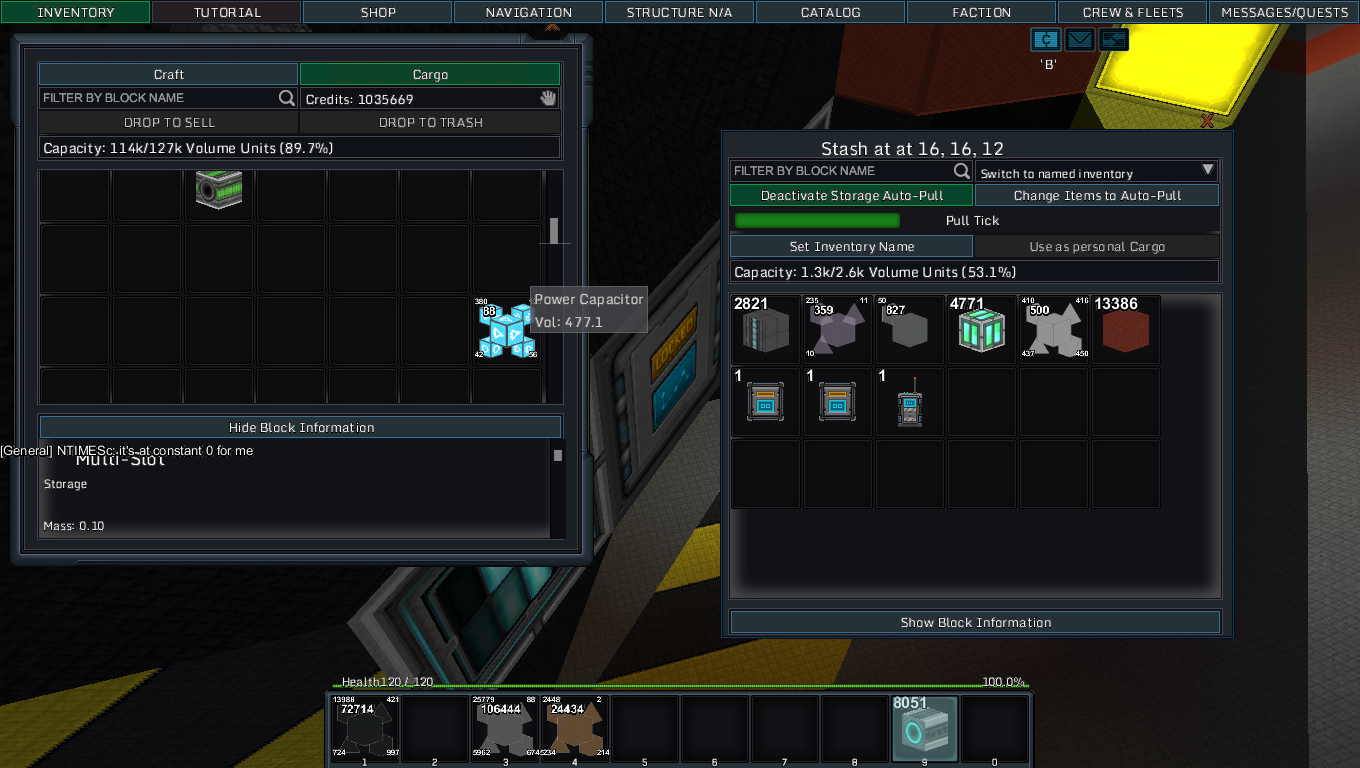
squirttle123 added a comment to T1819: Tooltip doesn't update for single stack items <-> multi slot | meta-item interaction .
so i took those in order
squirttle123 added a comment to T1819: Tooltip doesn't update for single stack items <-> multi slot | meta-item interaction .
ok so i took 3 picts when i reproduced this bug
it was when moving cargo:
eosrei added a comment to T1825: no longer Comments in settings.cfg on Ubuntu.
Haha! I cannot reproduce on a fresh install of Ubuntu 16.04 in Virtualbox. Same base OS version, same Java version. It's correctly setting Default/128 in the settings.cfg. I can reproduce every time on my host system Ubuntu 16.04/Mint 18. Can you check the code where it's setting G_TEXTURE_PACK when settings.cfg is missing? Where does the value come from? Doesn't seem hardcoded.
eosrei added a comment to T1825: no longer Comments in settings.cfg on Ubuntu.
you did install from steam first and then did reinstall to the same folder using the webside launcher ?
SmilingDemon added a comment to T1825: no longer Comments in settings.cfg on Ubuntu.
that is really weird ...
to check this i also made a new install and it wasnt using pixels for that.
eosrei added a comment to T1825: no longer Comments in settings.cfg on Ubuntu.
I never heard of the game until yesterday. Fresh install on both direct download and Steam. I deleted the settings.cfg and started the game. It created it again with Pixel/128.
SmilingDemon moved T1825: no longer Comments in settings.cfg on Ubuntu from Unclassed to Issue affecting current release on the Starmade board.
SmilingDemon moved T1825: no longer Comments in settings.cfg on Ubuntu from New / Unconfirmed to Feedback on the Issue Navigation board.
SmilingDemon added a comment to T1825: no longer Comments in settings.cfg on Ubuntu.
a fresh game install does create this
SmilingDemon moved T1820: Chain of Wireless Broken from New / Unconfirmed to Feedback on the Issue Navigation board.
SmilingDemon added a comment to T1820: Chain of Wireless Broken.
its working like this