Yes, that works.
Feed Advanced Search
Jan 16 2017
Jan 16 2017
erthparadine updated the task description for T2166: Full transparency on all nearby blocks.
Jan 14 2017
Jan 14 2017
SmilingDemon raised the priority of T2159: Race disappears from race menu from Low to Pre-Release Quality Assurance.
• DeletedAccount added a comment to T2159: Race disappears from race menu.
SmilingDemon added a comment to T2159: Race disappears from race menu.
ok .. i checked it
creating a game setting up the gates properly and all is working fine
only thing is the GUI isnt being updated it seems
see if this is the same for you:

SmilingDemon edited Clientconfig (settings.cfg) on T2164: Loading empty shader.
SmilingDemon added a comment to T2165: Green pickup rail textures are backwards.
not much to say about
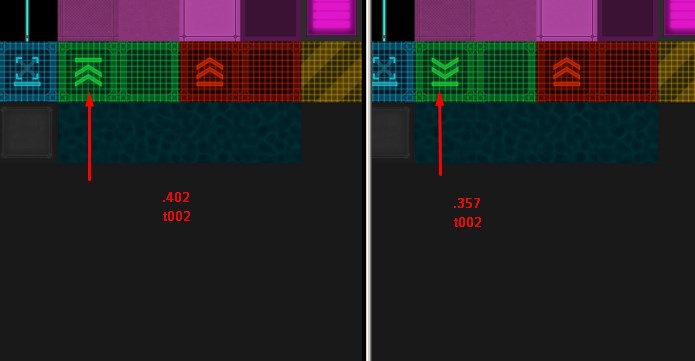
SmilingDemon triaged T2165: Green pickup rail textures are backwards as Pre-Release Quality Assurance priority.
TBB added a comment to T2164: Loading empty shader.
I found a workaround anyways that seems to make the game run ok at the moment.
I simply copied cube-3rd.vsh and cubeTArray.fsh from my other workmachine's old SM backups (v0.199.253).
These files are located at *game*/data/shader/cube/quads13.
Jan 13 2017
Jan 13 2017
• DeletedAccount added a comment to T2159: Race disappears from race menu.
I have done that. The issues persists for me with multi-gate race courses, and with the end gate connected to the beginning.
SmilingDemon moved T2159: Race disappears from race menu from New / Unconfirmed to Feedback on the Issue Navigation board.
SmilingDemon added a comment to T2159: Race disappears from race menu.
afaik the race needs a start and end point that are connected with the beam tool (which i think can be the same gate by linking it to itself).
did you do that ? .. if not i think this is a user error and not a bug.
SmilingDemon triaged T2162: Slabs' touching sides will not render if one slab is opaque and the other is transparent. as Normal priority.
Endal edited Steps to reproduce on T2163: Bricked button/activation module after logic activity with rails.
gamesaucer added a comment to T2162: Slabs' touching sides will not render if one slab is opaque and the other is transparent..
I made a screenshot of what it looks like.
17joshuanewcomb added a comment to T2161: Crash on loading into server (Linux).
Thank you for the fix bro.
Jan 12 2017
Jan 12 2017
SmilingDemon added a comment to T2161: Crash on loading into server (Linux).
its T1825 .. will merge it there later
SmilingDemon moved T2160: Launcher crashes without opening launcher window from New / Unconfirmed to Feedback on the Issue Navigation board.
SmilingDemon moved T2161: Crash on loading into server (Linux) from New / Unconfirmed to Feedback on the Issue Navigation board.
-support problem-
-and known bug-
SmilingDemon added a comment to T2160: Launcher crashes without opening launcher window.
please start the launcher from a comand line with the added option --verbose to it. (or create a link and pass that option there)
Jan 11 2017
Jan 11 2017
TranzorZed added a comment to T2148: Left-Facing Missile Computer keep firing to the Right.
The very bottom platform is pretending to be the ship the rest of it attaches to. If you are going to test this on an actual ship then you won't need that part.
Jan 10 2017
Jan 10 2017
SmilingDemon added a comment to T2148: Left-Facing Missile Computer keep firing to the Right.
at first that worked fine for me
zoomed out and fired both without a problem
Jan 9 2017
Jan 9 2017
mokunen added a comment to T2155: Fails to launch on Arch Linux 64bit.
I solved the issue. It wasn't about the bundled java version or the native libraries; I did try the former after forcing a redownload, and linked the latter to the respective /usr/lib folders anyway, to no avail. But then I found by the tried-and-true method of "googling some more" that, TL;DR: I hadn't quite installed XRandR as I thought (source: http://forum.lwjgl.org/index.php?topic=5742.0)
TranzorZed added a comment to T2148: Left-Facing Missile Computer keep firing to the Right.
Here is the turret in question. It is a capital turret for a Klingon Ship, which can detatch and be a ship of its own. When you spawn this blueprint, enter into the core of the lowest platform. Go to Entity Structure, Rail System Collective, make sure you Deactivate AI Turrets and then Reset AI Turrets. You must do this before extending or retracting the assembly, though none of this is necessary to check the Missile issue. But you should know about it so that you don't run into other issues while playing with this.
SmilingDemon triaged T2158: Sector Exports fail to carry over designs from blueprints as Normal priority.
SmilingDemon moved T2155: Fails to launch on Arch Linux 64bit from New / Unconfirmed to Feedback on the Issue Navigation board.
SmilingDemon added a comment to T2155: Fails to launch on Arch Linux 64bit.
not a Launcher bug ... the launcher did already start the game if a logstarmade.x.log file gets created
did you try using the java embedded with the launcher to start the game ?
try to force redownload the game in case a file was corrupted

Jan 8 2017
Jan 8 2017
Croquelune updated the task description for T2157: Game crash at start.
Croquelune updated the task description for T2157: Game crash at start.
Croquelune created T2157: Game crash at start.
DocHellfish updated the task description for T2156: Disappearing Dockings for Fleet Controlled Ship.
Jan 7 2017
Jan 7 2017
SmilingDemon changed Last tested (version) from 0.199.351 to 0.199.358 (DEV) on T2110: Purchase Window in Set Price Tab Under Shop Menu Is Too Small/ Doesnt Scale / Un-resizable..
SmilingDemon added a comment to T2110: Purchase Window in Set Price Tab Under Shop Menu Is Too Small/ Doesnt Scale / Un-resizable..
OK .. stupid me. Its Admin dependend. it rescales for Admins but not for usual players (therefore it works in SP because you are Admin by default)
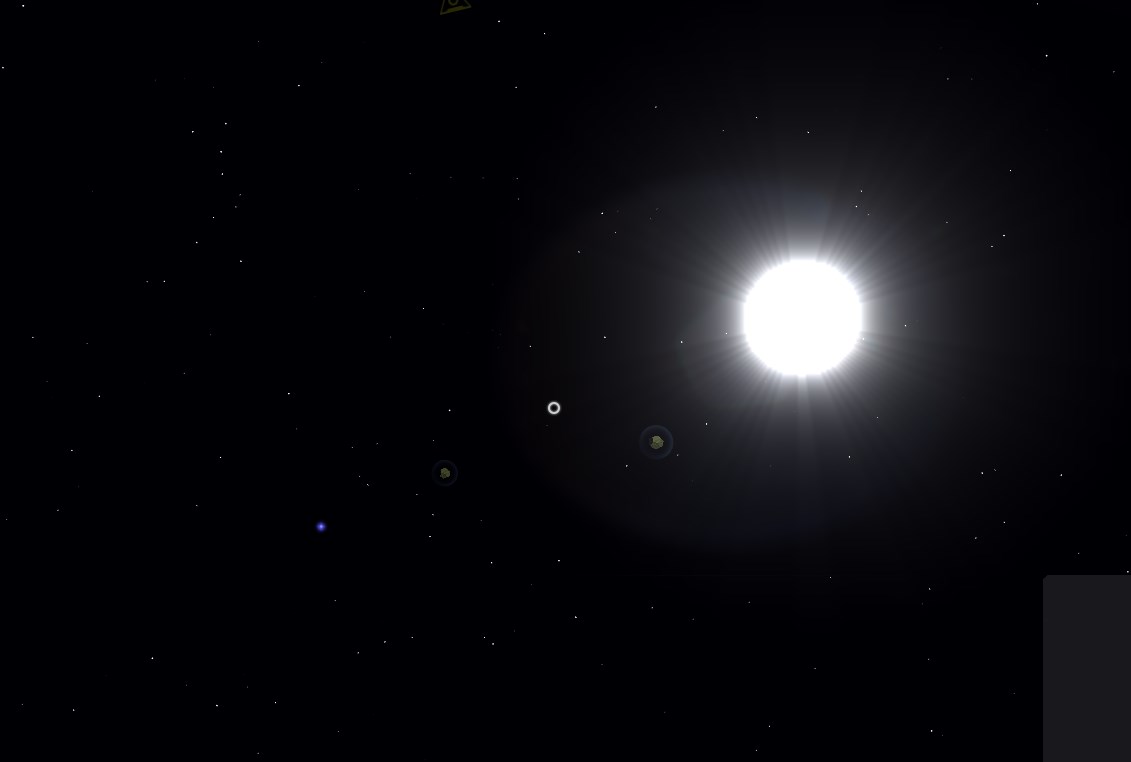
DarkThoughts added a comment to T2153: Bloom renders stars as blury transparent dots.
The only one that comes close would be borderless gaming which isn't active on Starmade nor Java.
That said I can't seem to reproduce it anymore either since it is now working.
It was only like that the first time I ran the game again after a long time and after the rejoin (went just back to the menu so not even a full restart) it is still fine.
I tested a clean install by removing the old install too and it still worked on the first launch. Not quite sure want went wrong there, maybe the report was a bit prematurely.
Might be some weird caching issue with the shaders which could also related to an AMD bug since their cards / drivers sometimes do weird things (at least for all the AMD / ATI cards I've owned so far).
SmilingDemon added a comment to T2110: Purchase Window in Set Price Tab Under Shop Menu Is Too Small/ Doesnt Scale / Un-resizable..
OK tried that on the testserver and it is fine ... checked on Brierie and i do see the same effect as you do.
i do assume they messed around with something that causes that ...
doesnt seem to be a problem on your install then
Ellorien added a comment to T2110: Purchase Window in Set Price Tab Under Shop Menu Is Too Small/ Doesnt Scale / Un-resizable..
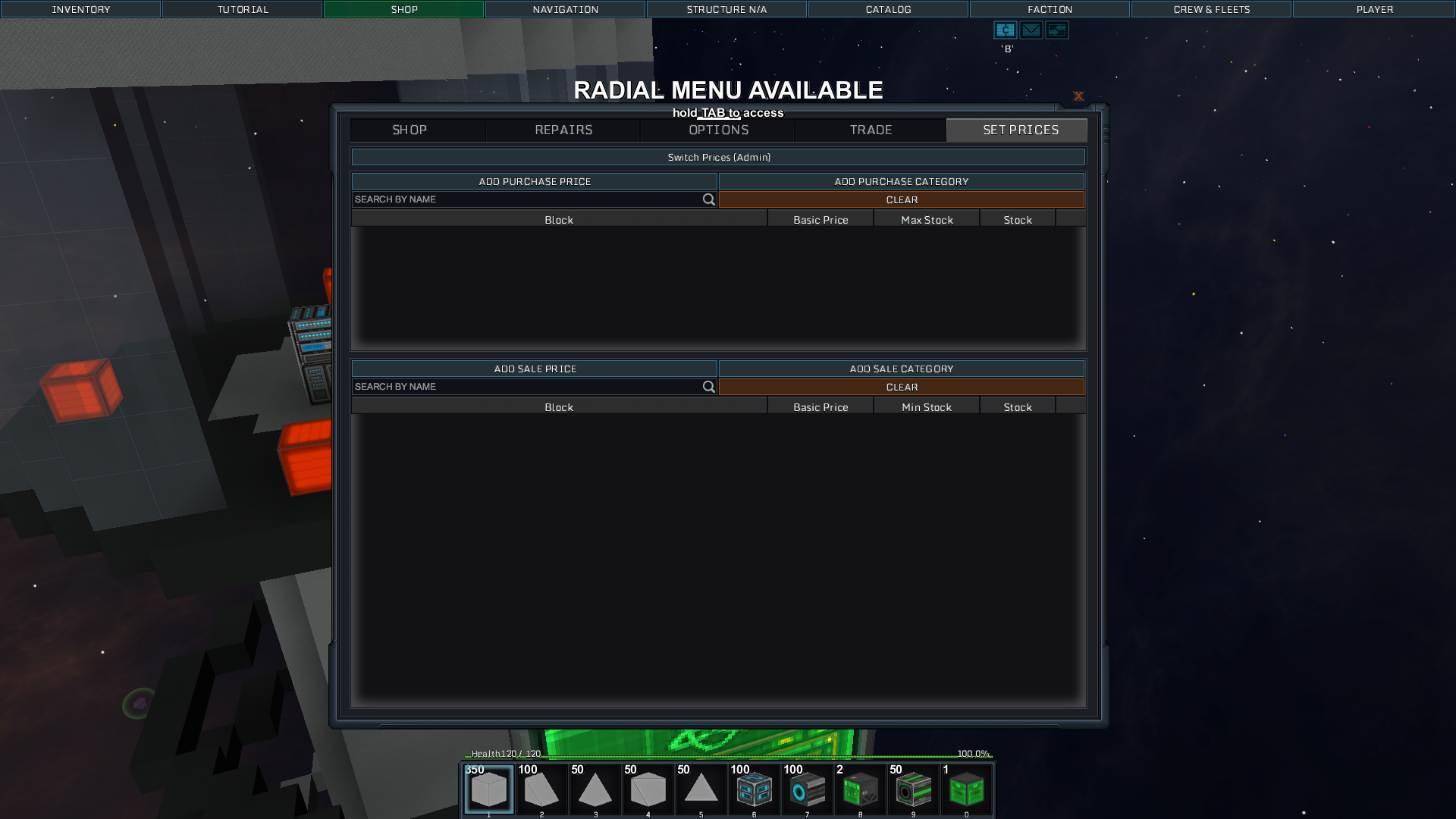
Ellorien added a comment to T2110: Purchase Window in Set Price Tab Under Shop Menu Is Too Small/ Doesnt Scale / Un-resizable..
I've tried re-installing with the new update v0.199.357. The window's size is fix-ed in single player, but still showing up as what i have submitted before in multiplayer. I've even tried deleting everything starmade related thing in user/appdata/roaming folder, Still occuring in multiplayer. I'm stumped atm. Is there a way to modify the set price window manually ? Or thru the use of MOD ?
Jan 5 2017
Jan 5 2017
SmilingDemon added a comment to T2148: Left-Facing Missile Computer keep firing to the Right.
works fine for me ... could you please build a sample for me that shows the effect .. and add the blueprint of it here ?
SmilingDemon added a comment to T2146: Game crashes when holding Ctrl (for Rotation Mode) with Blue Decorative Console selected.
maybe the same file than in T2119 ??
SmilingDemon added a comment to T2146: Game crashes when holding Ctrl (for Rotation Mode) with Blue Decorative Console selected.
still cant reproduce
using an RX 470 and slightly older drivers
SmilingDemon moved T2153: Bloom renders stars as blury transparent dots from New / Unconfirmed to Feedback on the Issue Navigation board.
SmilingDemon added a comment to T2153: Bloom renders stars as blury transparent dots.
cant reproduce
DarkThoughts updated the task description for T2153: Bloom renders stars as blury transparent dots.
Thexare added a comment to T2146: Game crashes when holding Ctrl (for Rotation Mode) with Blue Decorative Console selected.
Edit: Attempted it from creative inventory in singleplayer, did not crash. Bizarre.
Croquelune added a comment to T2149: Too much lag.
A thing that can relief your computer if you play solo mode or your own custom server is to reduce the planet size in the file "server.cfg".
TranzorZed added a comment to T2148: Left-Facing Missile Computer keep firing to the Right.
I observed it in Build Mode. I moved to the loaction where the missile tubes are placed. There is an empty compartment around them. I go into flight mode, fire the missiles, then switch to Build Mode and see the missiles travelling to the right inside the compartment and colliding with the interior of the turret. If I go outside of the ship in Build Mode, I never see the missiles leave the ship. If I stay in Flight Mode while firing, I hear the explosions happening right next to me. If I lock on to a target, the missiles still never leave the turret. It is not a visual bug. The missiles fire to the right when the computer is oriented to the left. I can provide a .sment file if you'd like.
Jan 4 2017
Jan 4 2017
jijiji added a comment to T2090: AI fires tracking missiles without locking enemy.
I mean that you need to spawn a lot of enemies near an AI ship. I see this bug sometimes. It's causing rarely. If you need, I can try to show it to you
SmilingDemon added a comment to T2146: Game crashes when holding Ctrl (for Rotation Mode) with Blue Decorative Console selected.
i cant reproduce that
please try again and crash the game. then please drag and drop the resulting logstarmade.0.log from the games log folder into an answer here.
SmilingDemon triaged T2146: Game crashes when holding Ctrl (for Rotation Mode) with Blue Decorative Console selected as Normal priority.
SmilingDemon added a comment to T2147: Ship AI does not target Missiles.
this is either a missing AI feature for ships ... or a intended behaviour and it shouldnt be possible to set a ship to intercept missiles.
SmilingDemon changed Last tested (version) from 0.199.357 to 0.199.358 (DEV) on T2147: Ship AI does not target Missiles.
SmilingDemon moved T2148: Left-Facing Missile Computer keep firing to the Right from New / Unconfirmed to Feedback on the Issue Navigation board.
SmilingDemon added a comment to T2148: Left-Facing Missile Computer keep firing to the Right.
how did you observe that the shot went in the right direction?
there is a bug with view direction from cameras when docked -> T47
could it be that problem or a variation thereof ?
SmilingDemon triaged T2148: Left-Facing Missile Computer keep firing to the Right as Normal priority.
SmilingDemon moved T2149: Too much lag from New / Unconfirmed to Feedback on the Issue Navigation board.
AndyP added a comment to T2149: Too much lag.
Usually the thread count for generation in the server.cfg is too high,
or your max drawn segments are too high.
AndyP edited Clientconfig (settings.cfg) on T2009: Derelict stations get false positive removal for "ship only blocks".
Dirk added a comment to T2144: switching from Build Mode to Flight mode rotates ship.
Hi.
Resolve the Problem!
At the keyboard settings the "Z" key was in place for two diferent controles.
Fixt it by setting key settings new.
SmilingDemon added a comment to T2149: Too much lag.
This is not a bug ... more like a support ticket.
Jan 3 2017
Jan 3 2017
TranzorZed updated the task description for T2148: Left-Facing Missile Computer keep firing to the Right.